

Last Updated: September 2026
Which is the right QMS for an early-stage biotech: a DIY spreadsheet setup, a large enterprise suite like MasterControl or Veeva Vault, or a unified platform built for smaller teams?
For most clinical-stage biotechs, none of the three fits perfectly out of the box. DIY tools (SharePoint, Excel) are cheap but carry hidden validation and audit-trail risk; enterprise suites are compliant but scoped for large IT/QA teams and multi-month rollouts; a unified compliance platform built for smaller, decentralized teams — such as Kivo — is designed to close that gap. The global life sciences quality management software market is projected to grow from roughly $4.35 billion in 2026 to $9.47 billion by 2033 (a ~12.65% CAGR, per Grand View Research) — a sign of just how many teams are actively working through exactly this decision right now.
You are tasked with monumental challenges:
- curing rare diseases
- navigating unforgiving regulatory landscapes
- managing limited cash runway
And all while trying to move at the speed of science.
In this environment, your Quality Management System (QMS) is supposed to be your safety net. It should be the bedrock that ensures every piece of data is traceable, every Standard Operating Procedure (SOP) is followed, and every risk is mitigated. (See 10 features every biotech QMS should include for the full baseline.)
However, for most Quality Managers at the Pre-IND to Phase 2 stage, the QMS is not a safety net.
It's a bottleneck.
When searching for a "Biotech QMS," emerging teams often find themselves trapped in a "Goldilocks Dilemma." On one side, there is the "DIY" approach: a patchwork of SharePoint, Excel, and Dropbox that feels agile but carries a heavy, hidden "compliance tax."
On the other side, there are the "Monoliths": legacy enterprise suites like MasterControl or Veeva Vault that offer robust compliance but are scoped, priced, and implemented for a very different kind of team than the one reading this guide.
You are forced to choose: Do you risk non-compliance with a system that is "too small," or do you risk operational paralysis with a system that is "too big"?
This guide argues that you shouldn't have to choose. The modern life sciences landscape demands a third option: a unified compliance platform that is designed for the smaller, decentralized teams of today. We'll look at why the traditional options fail emerging teams, profile the two most common enterprise alternatives directly, and show how a unified approach lets you scale your quality operations without slowing down the science.
Table of Contents
- The Hidden Risks of the "Status Quo" (Why DIY Is Dangerous)
- Why "Enterprise" Tools Often Fail Emerging Teams
- MasterControl Quality Management System
- Veeva Vault QMS
- Which Option Fits Your Team?
- The Solution: The "Unified" Biotech QMS
- How Kivo Helped Elpida and Hyloris
- Frequently Asked Questions
Section 1: The Hidden Risks of the "Status Quo" (Why DIY is Dangerous)
For many early-stage biotechs, the default QMS is no QMS at all. It is a folder structure in Microsoft SharePoint or Google Drive, supported by a master tracker in Excel.
It is easy to see why this happens. These tools are ubiquitous and seemingly cost-effective. But as you approach your first IND filing or prepare for a partnership audit, the cracks in the "DIY" foundation begin to show.
While SharePoint is an excellent collaboration tool, it is not a QMS. Attempting to force it to behave like one creates a debt of manual overhead and regulatory risk that you will eventually have to pay, often with interest.
If you are currently managing Quality in SharePoint, you are likely facing three critical vulnerabilities that an auditor will spot immediately.
1. The Validation Trap
The FDA and other global regulatory bodies require that any electronic system used to manage GxP data be validated for its intended use. SharePoint is not Part 11 compliant out of the box. To make it compliant, you must configure it extensively, disable certain native features, and implement third-party plug-ins for electronic signatures.
Even if you achieve a validated state, maintaining it is a nightmare. Every time Microsoft updates the cloud platform — which happens constantly and automatically — your validation status is technically at risk. You are forced into a cycle of continuous re-validation, often requiring expensive external consultants to prove that a software update didn't break your compliance posture.
What looked like a "low-cost" solution quickly becomes a massive drain on your IT and Quality budget.
2. Audit Trail Deficiencies
In a GxP inspection, the audit trail is your primary defense. An auditor needs to reconstruct the "who, what, when, and why" of every document change.
Standard cloud storage logs are often mutable or lack the granularity required by 21 CFR Part 11. They might show that a document was "edited," but they fail to capture exactly what was changed, or they allow an administrator to clear logs, violating the principle of immutability.
This can have massive consequences, because if you cannot prove the integrity of your data history, your entire study or submission can be called into question.
3. Version Control Nightmares
In a manual system, version control relies on human discipline. We have all seen the filename SOP-001-Final_v2_EDIT_REAL_FINAL.docx.
When documents are stored in folders without strict lifecycle controls, duplication is inevitable. A researcher might save a copy of an SOP to their desktop, unaware that Quality has issued a new version the next day.
This puts your team at risk of executing a procedure using an obsolete document. In a clinical setting, that is a protocol deviation that can compromise patient safety or data integrity.
The trap here is that while version control is tedious and frustrating, it can be managed at a small enough scale during seed-stage research that it becomes normalized. But once you enter the regulated domain, these problems transform from an annoyance to a massive liability.
Section 2: Why "Enterprise" Tools Often Fail Emerging Teams
If the DIY approach is "too small," the logical next step seems to be to turn to the industry standards. This usually means evaluating legacy giants like Veeva Vault or MasterControl. These systems are undeniably powerful and compliant. For Big Pharma companies with thousands of employees and dedicated IT departments, they are often the right choice.
However, for an emerging biotech with a team of 10, 50, or even 200, these systems are generally scoped, priced, and implemented for organizations with dedicated IT and QA administration — a different shape of team than the one reading this guide. They are designed for organizations with complex, rigid hierarchies, not for agile teams that need to pivot quickly.
1. Enterprise Pricing Expectations
There is a huge difference between how enterprise companies approach software and how everyone else approaches software.
And in the life sciences space in particular, legacy vendors build their pricing models on the assumption that you are a Big Pharma company with Big Pharma resources.
- They charge massive licensing fees for a bloated suite of features, 80% of which you will likely never use.
- They expect you to invest hundreds of thousands of dollars in custom development to make their software usable with your specific workflows.
- And they expect you to have a fulltime IT administrator in-house to maintain the software and keep it working throughout the year. (See what QMS you can implement without a dedicated IT team.)
Furthermore, they assume you have the luxury of time. An enterprise software rollout often takes 6 to 12 months of configuration, validation, and training before the system is even live — see how long a life sciences QMS implementation actually takes for a breakdown by platform type.
For a small team with a limited runway, paying for shelf-ware and waiting a year for ROI is not a strategy; it's a liability. You need a system built for speed, not one that requires a dedicated IT department to launch.
2. The Usability Crisis and "Shadow IT"
And while cost is a big deal, especially today, "expensive" can be justified when it's providing the best experience. And this is why the most significant failure of legacy systems in the emerging market is usability.
If a QMS is difficult to navigate, your scientists and clinical operations teams will find ways to avoid using it. They will email documents for review instead of using the system's workflow. They will store working drafts on their hard drives. This phenomenon is known as "Shadow IT," and it renders your expensive QMS useless. If the work isn't happening in the system, the system isn't ensuring compliance.
When we look at reviews for these systems from folks in life sciences, we see this feedback frequently.
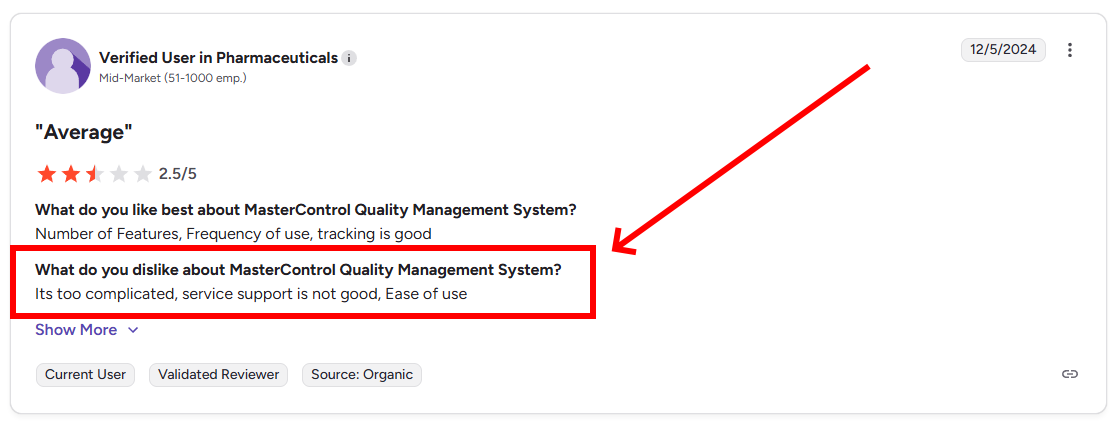
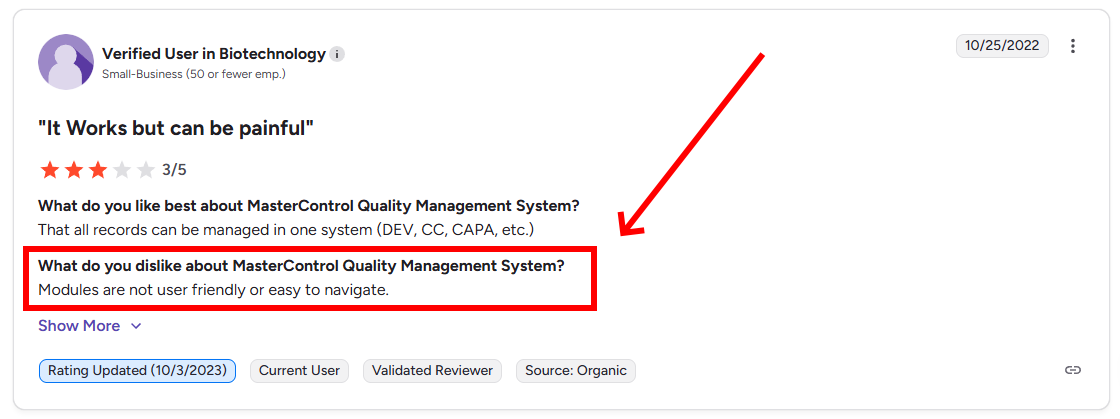
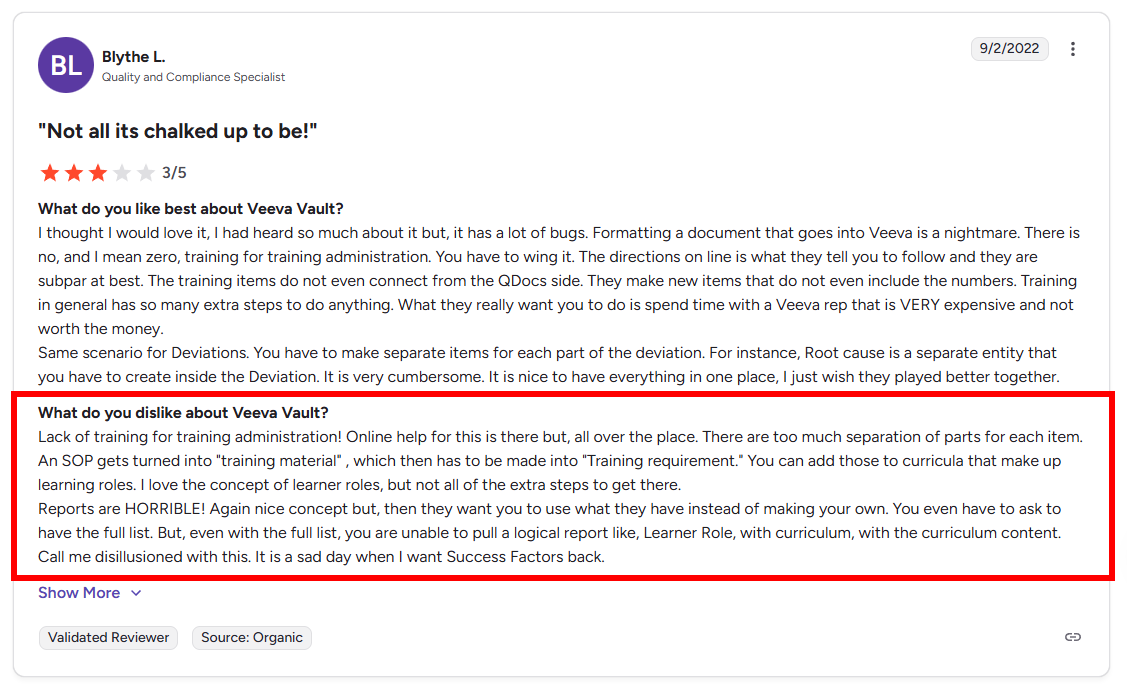
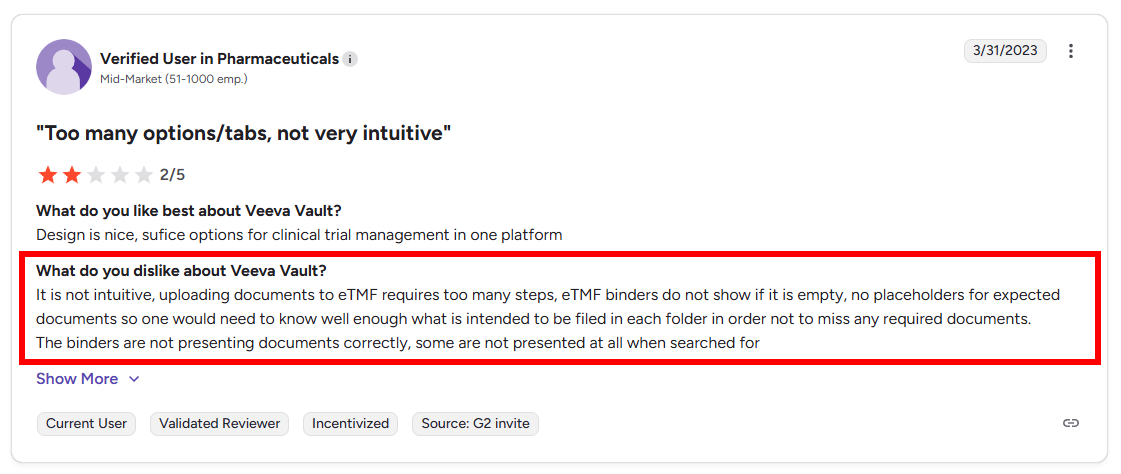
It's one thing to pay a premium. It's another thing to pay a premium for software that is unintuitive and difficult for your team to use.
3. The "Silo" Problem
Legacy vendors often sell their software in modules. You buy a QMS. Then, if you need to manage regulatory files, you buy a RIM system. If you need to run a trial, you buy an eTMF.
These modules are often built on different codebases (sometimes acquired through mergers) or require complex integrations to talk to one another. This creates Data Silos.
For example, a Clinical Operations Manager might update the Investigator's Brochure (IB) in the eTMF. However, the Regulatory team is still working off the old version in the RIM system because the two systems don't sync automatically.
As a result, you end up with discrepancies between the files at the clinical site and the files in your regulatory dossier. Reconciling these silos requires manual "swivel-chair" data entry, which introduces human error.
Worst of all, this scenario is entirely unnecessary in the modern software era. You should not be having to deal with it.
| Feature / Attribute | MasterControl |
Veeva Vault | Kivo | The Impact on Your Team |
| Ease of Use | 7.8 / 10 |
7.7 / 10 | 9.8 / 10 | Low scores lead to low adoption and "Shadow IT." |
| Ease of Setup | 7.6/10 |
7.6 / 10 | 9.7 / 10 | Months of implementation vs. weeks. |
| Ease of Admin | 8.0/10 |
8.6 / 10 | 9.5/ 10 | No fulltime IT required. |
| Quality of Support | 8.6/10 |
8.6/10 | 9.6/10 | Startups need fast answers, not 72-hour ticket queues. |
This comparison reflects each vendor's publicly published G2 satisfaction scores and feature set as of September 2026. It isn't an independent ranking, and it doesn't assess your organization's specific implementation needs, contract terms, or existing vendor relationships — validate directly against your own requirements before deciding.
MasterControl Quality Management System
Overview: MasterControl's QMS is part of its broader quality and manufacturing-excellence software suite, widely deployed across pharma, biotech, and medical device manufacturing. It was named the No. 1 QMS on G2 for Winter 2026.
Capabilities: Document control, CAPA, deviation management, training, complaint handling, and audit management, with the option to connect into MasterControl's broader manufacturing execution (MES) tools.
Strengths: A deep, mature feature set built over two decades in regulated quality management; a large existing customer base across life sciences and other regulated industries; strong document-control and training modules; G2's Best Usability and Highest User Adoption badges among its broader recognition.
Weaknesses: Typically scoped, licensed, and configured for organizations with dedicated IT and QA administrative capacity; implementations commonly run in the range of several months rather than weeks.
Ideal Use Cases: Later-stage or commercial-scale manufacturers with complex, multi-site quality operations and an in-house team to own configuration and administration.
Veeva Vault QMS
Overview: Veeva Vault QMS is one application within Veeva's broader Vault platform, which also includes Vault RIM, Vault CTMS, and other regulated-content applications — popular among large pharmaceutical companies and CROs already standardized on Veeva.
Capabilities: Quality events (CAPA, deviations, complaints), document control, training, and audit management, with native cross-application data sharing for organizations running multiple Vault products together.
Strengths: A strong integration story for organizations already running other Veeva Vault applications; broad presence and familiarity among large enterprise pharma teams; a single content backbone if a company has already standardized on Vault elsewhere.
Weaknesses: Licensing, configuration, and implementation are generally scoped for enterprise-scale deployments; a smaller, earlier-stage team adopting Vault QMS as a standalone module — without the rest of the Vault suite — may find setup and per-module cost disproportionate to its size.
Ideal Use Cases: Large biotech and pharma organizations already invested in, or actively evaluating, the broader Veeva Vault ecosystem.
Which Option Fits Your Team?
Laid out plainly, each of the three approaches fits a different stage and shape of team:
- DIY (SharePoint/Excel): defensible only very briefly, pre-IND, for a team that fully understands (and is actively planning to close) the validation and audit-trail gaps described in Section 1 — not a stance to hold into clinical trials.
- Enterprise suites (MasterControl, Veeva Vault): the right choice for organizations that already have dedicated IT/QA administrative staff, a multi-month implementation runway, and either commercial-scale manufacturing or an existing standardization on that vendor's broader ecosystem.
- Unified platforms built for smaller teams (Kivo): aimed at the clinical-stage biotech that needs full Part 11 compliance now, without the headcount or timeline an enterprise suite assumes.
None of these three is universally "correct" — the right answer depends on your team's headcount, IT capacity, and how close you are to your first IND filing or partnership audit. What doesn't hold up under any of these paths is staying with DIY tools past the point where you can defend that choice to an inspector.
Section 3: The Solution: The "Unified" Biotech QMS
To escape the Goldilocks Dilemma, emerging biotechs are increasingly turning to modern, unified platforms like Kivo.
A Unified QMS uses a single document management system to store and manage across quality, regulatory, and clinical. This eliminates the need for version control and document reconciliation entirely.
1. The Single Source of Truth
In a unified system like Kivo, a document exists as a single object, regardless of where it is viewed.
When Quality approves a new version of a protocol in the QMS, that document is instantly updated in the Clinical Trial Master File (eTMF) and the Regulatory Information Management (RIM) view.
There is zero latency between approval and distribution. You eliminate the risk of version conflict across departments. Your Regulatory team never has to ask, "Is this the latest version?" They know it is.
2. Intuitive User Experience
Life sciences teams have unfortunately become accustomed to clunky, rigid, and complex software that requires weeks of specialized training to master.
Kivo is designed to be the antidote to the clunky, rigid, and complex software that life sciences folks have become used to. By prioritizing consumer-grade design, Kivo ensures that the compliant way to work is also the easiest way to work.
If you can use Microsoft apps, you can use Kivo, probably without any training. Our interface is clean, intuitive, and looks like it was built in 2025... not 2005.
And we're not just saying that about ourselves. Our customers say it about us. Kivo holds a 9.8/10 Ease of Use score on G2, significantly outperforming the industry average and our legacy competitors.
3. Embedded Quality
Quality shouldn't be a "police function" that sits outside your daily operations. It should be embedded in the workflow.
In a unified environment, Quality events trigger operational actions. For example, if an SOP is updated in the QMS, the system can automatically trigger training tasks for the relevant clinical staff. Access to the new SOP is gated until training is complete. This ensures that compliance is an automated part of the business process.
4. Right-Sized Pricing
Emerging biotechs have to protect their cash runway. The pricing models of legacy vendors assume Big Pharma resources — Kivo's don't.
Two tiers are sized to fit your team — Standard (starting at 5 users) and Enterprise (100+ users) — with feature parity between them, so you scale up without switching platforms. A typical emerging-biotech deployment (DMS + QMS + Training) runs roughly $29,000/year, plus a one-time $5,000 setup fee that covers configuration, training, and go-live:
- Fully validated system ready out of the box, no setup or development fees required beyond the one-time fee above
- Rapid, weeks-not-months implementation with unlimited training, maintenance and support
And none of these fees:
- No configuration change fees
- No "Connector" fees
- No active study fees
- No per GB storage fees
- No training fees
- No upgrade fees
- No maintenance fees
- No validation fees
- No data lock-in. Ever.
When you schedule a chat with our team, we'll help you figure out exactly what you need, and then you'll know exactly how much you'll pay to use Kivo for the next year+, which means you can actually budget with confidence rather than wondering about when the next hidden cost will rear its head.
How Kivo Helped Elpida and Hyloris
How Kivo Helped Elpida Therapeutics Surpass Sharepoint
Elpida is a small gene therapy team on a life-saving mission to cure a rare disease in children. Their team is lean, their timeline is aggressive, and their margin for error is zero. They began, like many, with a DIY mindset but quickly realized the risks were too high. However, they couldn't afford the six-month implementation timelines of a Veeva or MasterControl.
Elpida chose Kivo for its speed and unified platform:
The Result: Elpida was "up and running in 3 weeks."
The Impact: By implementing a system that combined QMS, eTMF, and RIM, they avoided the "compliance tax" of disjointed systems.
The Quote: As their team noted, "We don't have time to mess around." For a company racing to save lives, administrative friction was an existential threat.
How Kivo Enabled Hyloris Pharmaceuticals To Double Programs
Hyloris Pharmaceuticals was growing rapidly and needed to scale their pipeline without exploding their headcount. They feared that a heavy enterprise system would slow them down, but a lightweight tool wouldn't handle their complexity.
Hyloris chose Kivo for version control, rapid implementation, and scalability:
The Result: Hyloris used Kivo to manage a complex portfolio of products.
The Impact: They successfully "doubled programs from 10 to 20 without increasing administrative burden."
The Quote: As their team noted, Kivo's software was easy to learn, "When I used it initially, I didn't need training on it - I was able to figure it out and navigate around the way I wanted to."
The Quality Solution Biotech Needs
For too long, biotech Quality Managers have been told that they have to compromise.
If you chose the "DIY" route, you compromised on compliance and safety, hoping you wouldn't get caught by an auditor or a data disaster. If you chose the "Legacy Enterprise" route, you compromised on speed and budget, paying for expensive shelf-ware that your team hated to use.
The market has evolved. The "Unified Compliance Workspace" proves that you can have rigorous, 21 CFR Part 11 compliance without the enterprise overhead described above. You can have a user-friendly interface without sacrificing audit readiness.
Your QMS should be an accelerant, not a brake. It's time to stop patching together spreadsheets and stop overpaying for legacy software that was built for the pharma giants of the 1990s.
Ready to right-size your Quality Management?
Don't let your QMS be the bottleneck that delays your IND or fails your inspection. See how Kivo gets you audit-ready in weeks, not months.
Frequently Asked Questions
What's the real difference between a unified compliance platform and an enterprise QMS suite for an early-stage biotech?
Enterprise QMS suites are usually one module inside a much larger platform, scoped and priced for organizations already standardized on that ecosystem. A unified compliance platform built for smaller teams combines document management, quality, regulatory, and clinical from the start, with implementation measured in weeks rather than months.
Is a large enterprise QMS platform a good fit for a small biotech team?
Large enterprise QMS platforms are typically feature-rich with big customer bases, but they're generally scoped for organizations with dedicated IT and QA administrative capacity, and implementations often run several months — worth weighing against your team's current size and runway before committing.
How long does it typically take to implement a biotech QMS?
It depends heavily on the platform: legacy enterprise suites often take 6 to 12 months to configure and validate, while modern, pre-validated platforms built for smaller teams are generally designed for a "weeks, not months" implementation timeline.
Does a QMS need to be 21 CFR Part 11 compliant from day one?
Yes, if it will manage any GxP-regulated document or record. Electronic signatures, audit trails, and access controls all need to meet Part 11 (and EU Annex 11) requirements from the start — retrofitting compliance later is far more disruptive than validating it upfront.
What should we ask a QMS vendor before switching platforms?
Ask how migration handles your existing audit trail (not just the documents), what "implementation" actually includes, and whether validation evidence ships with every release or is left to your team to produce and maintain yourselves.
Sources
- Grand View Research, "Life Sciences Quality Management Software Market" — 2026 market sizing and CAGR.
- G2, MasterControl Quality Management System reviews — Ease of Use, Ease of Setup, Ease of Admin, and Quality of Support scores.
- G2, Kivo vs. Veeva Vault comparison page — Kivo, Veeva Vault QMS satisfaction scores.
